Roadmaps and PI planning
Show what each project delivers and when, and plan a quarter across teams.
Roadmaps
Roadmaps shows what each project is delivering and when, as a timeline grouped by project with a line for today.
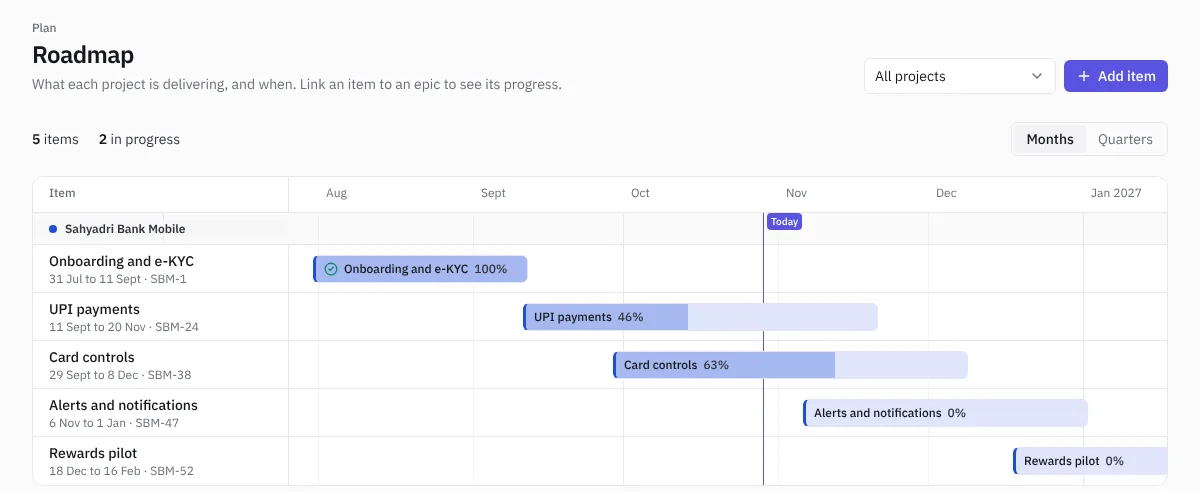 The roadmap
- Choose Add item.
- Pick the project, name the item, set start and end dates, and link it to an epic.
- The bar fills in as the epic's issues get done. Items past their end date and not finished are flagged as late.
Switch between Months and Quarters, and filter by project. Click an item to edit or delete it. On a phone the roadmap shows as a list of cards.
Owners, admins and managers can change the roadmap.
PI planning
A program increment (PI) is a planning window, usually 8 to 12 weeks, that several teams plan together.
- Open PI planning and choose New increment. Give it a name and dates.
- Each team's sprints inside the window appear on one board with their load.
- Add team objectives and give each a business value. At the end of the increment, score them to see how predictable the teams were.
- Dependencies between teams come from issue links: when an issue blocks another team's issue, it shows here, with the ones at risk flagged.
Dependencies at the top of PI planning lists every cross-team dependency in the workspace.
PI planning needs the Delivery plan or the Firm Pack. During the free trial it's included.