Automation rules
Let NaatOps move, assign, label or comment on issues when something happens.
Rules act on issues for you. Owners, admins and managers manage them in Settings › Automation. Automation needs the Delivery plan or the Firm Pack, and it's included during the free trial.
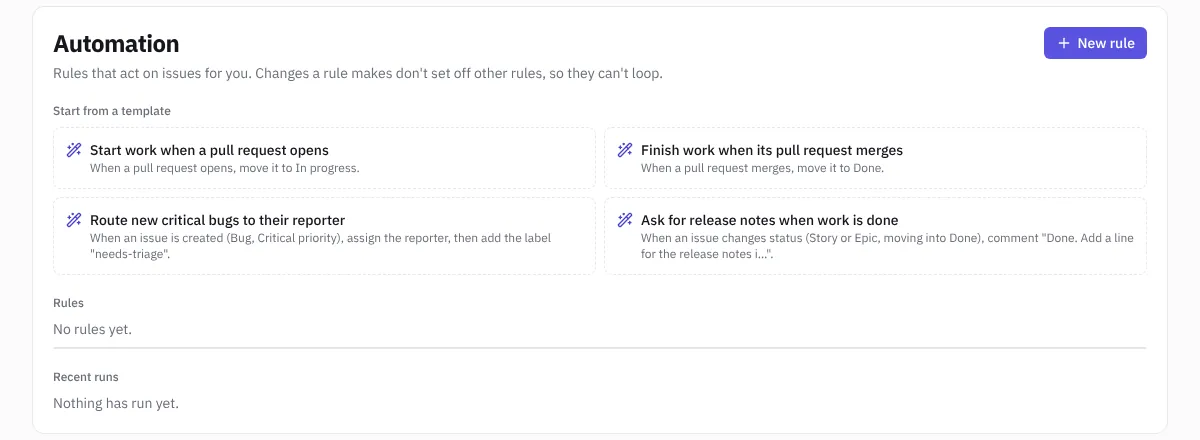 Automation
Start from a template
- Start work when a pull request opens: moves the issue to In progress.
- Finish work when its pull request merges: moves it to Done.
- Route new critical bugs to their reporter: assigns critical bugs to whoever reported them and adds the label needs-triage.
- Ask for release notes when work is done: comments on stories and epics that move to Done, asking for a line for the release notes.
Choose a template, adjust it and choose Create rule.
Build your own
Choose New rule and set:
- Name.
- Project: one project or all projects.
- When: an issue is created, an issue changes status, a pull request opens, or a pull request merges.
- Only for: limit the rule to some issue types or priorities. For status changes, choose the kind of status the issue moves into. Leave empty for all.
- Then: up to five actions:
- move to a to-do, in-progress or done status,
- assign to the reporter, a person or nobody,
- set the priority,
- add a label,
- comment on the issue.
Turn a rule off and on with its switch, or delete it. Issues a deleted rule already changed stay as they are.
Good to know
- Changes a rule makes don't set off other rules, so rules can't loop.
- Pull request triggers need the repository's webhook; see Pipelines and code.
- Recent runs lists what each rule did, on which issue.