People and capacity
See who is working on what each week, spot overload and plan allocations and teams.
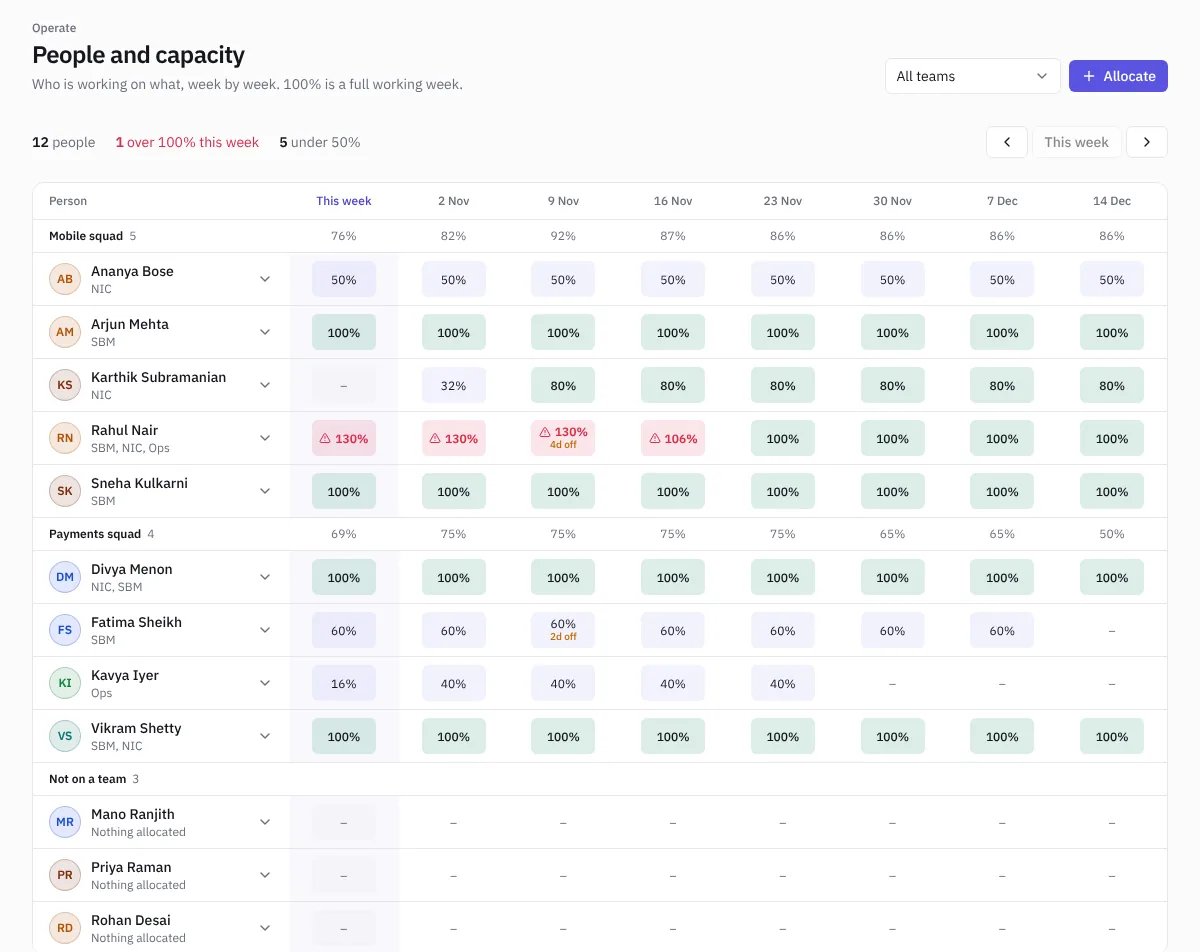
People and capacity shows each person's load week by week for eight weeks, grouped by team. 100% is a full working week.
 People and capacity
- Light cells are under 80%, green cells 80 to 100%, red cells over 100%.
- Approved leave shows in the week it falls, for example 2d off.
- The summary at the top counts people over 100% this week and people under 50%.
- Use the arrows to move through the weeks, and the team filter to show one team.
Allocate someone
- Choose Allocate, or click a week in someone's row.
- Pick the person and the project, the share of their week (for example 50%) and the dates.
- Save. Their row updates straight away.
Click an allocation to change or remove it.
Teams
Choose Manage teams, or open Settings › Teams, to create teams, add people and give them team roles such as Product Owner, Scrum Master, Tech Lead, Developer, QA, Business Analyst or Designer.
Owners, admins and managers can allocate people and manage teams. Everyone can see the view.